Action Items
Team members across your organization spend countless hours a week assessing and reporting on all sort of initiatives like Inspections, Incident Reporting, Hazard IDs, and all sorts of other forms. Inevitably, they drum up deficiencies - Gotchas that, if left unattended, could lead to further incidents. Those deficiencies need to be handled, and you need to know the where, why, when, who, and how.

Identifying deficiencies
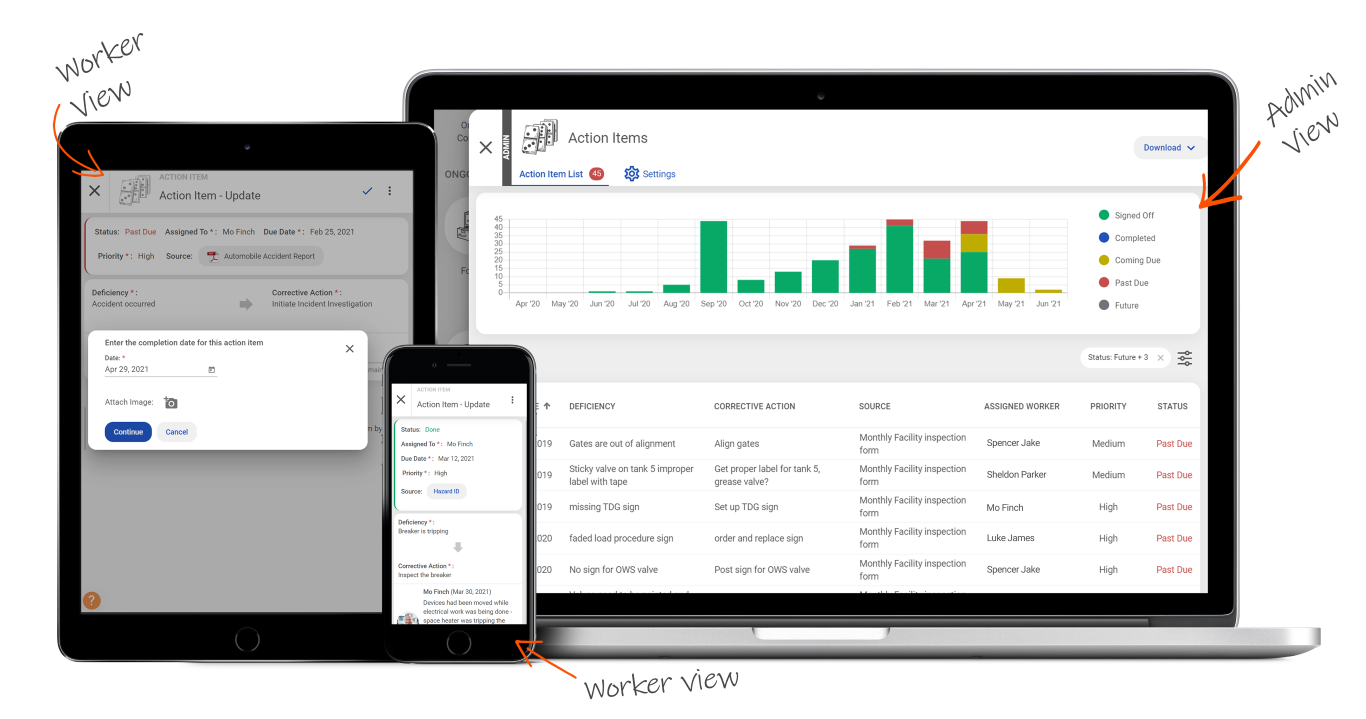
As your workers submit their inspections incident reports, safety meetings, and forms, deficiencies will invariably be found. Administrators (and workers with permission) can then create Action Items, tasks assigned to specific individual identifying problems - “Washer fluid low” - and indicating the necessary corrective actions - “Refill washer fluid”. For each action item created, an assignee can be chosen, a due date can be set, and a priority can be listed. Related documents can be included, such as photos or PDFs, to add context or detail. The creator can then optionally choose to notify the assignee by email, text, both, or neither. Regardless of the choice, the action item will then appear in the assignee’s required items. Reminders are provided as the action item ages, progressing from To Do to Coming Due and eventually to Past Due or Completed.
Taking corrective action
Assignees will see action items assigned to them from their Worker dashboard. They can read through the deficiencies and recommended corrective action, review any attached documentation or imagery, and verify the due date. As they work through the needed action, they can add comments to track their progress and ultimately mark the action item as complete. If the assignee isn’t able to complete the task, action items can be reassigned to others to ensure nothing gets left undone. Any and all changes to an action item are tracked in the activity feed.


Signing off on completion
Once complete, each action item needs to signed off by an administrator. The system keeps a nice log of all action item at all stages of their lifecycle. The objective? To see every deficiency corrected and signed off, making your workplace safer. It also doesn’t hurt that you or your auditor can navigate back to the source document for each action item in the list.
Overview
Assign
Identify deficiencies and corrective actions and assign them to workers.
Notify
The system notifies workers that they have been assigned an Action Item via SMS or email.
Corrective Actions
Workers attach photos and documents, add comments, and select statuses to ultimately complete Action Items.
Verify
Administrators verify that Action items are completed properly and sign-off once they are complete.
Still have questions?
Let our knowledgeable sales team give you a full product tour and answer any specific questions you may have.